 AiGe'ez
Support
Help with AiGe'ez
Turn the keyboard on, switch between keyboards, and tell us when something goes wrong.
Turn the keyboard on
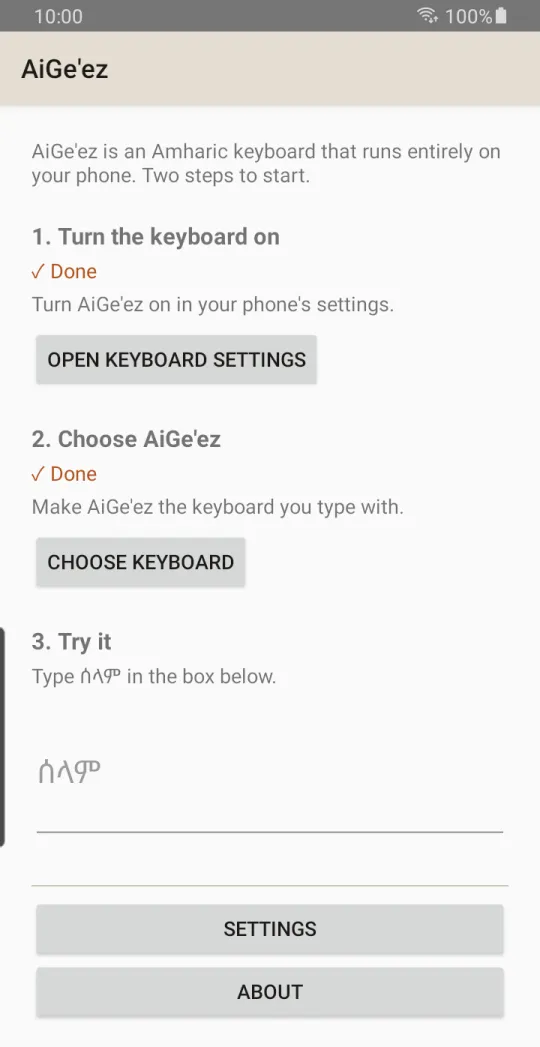
- Open the AiGe'ez app.
- Tap Open keyboard settings and turn AiGe'ez on in your phone's settings.
- Go back to the app, tap Choose keyboard and pick AiGe'ez.
- Try it: type ሰላም in the box in the app.
Switch keyboards
- On the AiGe'ez keyboard, tap the globe key to switch to your other keyboard.
- When another keyboard is open, tap the keyboard icon at the bottom right of the screen and choose AiGe'ez.
Report a problem
- In the app, open Settings and tap Report a problem. This opens your email app with a message to us. Nothing is sent unless you choose to send it.
- Or email us at admin@daxorion.com.
Read how we handle your information in the privacy policy.